Solana in SSP
Solana is fast, cheap, and increasingly where stablecoins actually move. It is also the chain where self-custody multisig has historically been hardest to get right — not because the cryptography is difficult, but because Solana's account model makes "an address that several people control" a much stranger object than it is on Bitcoin.
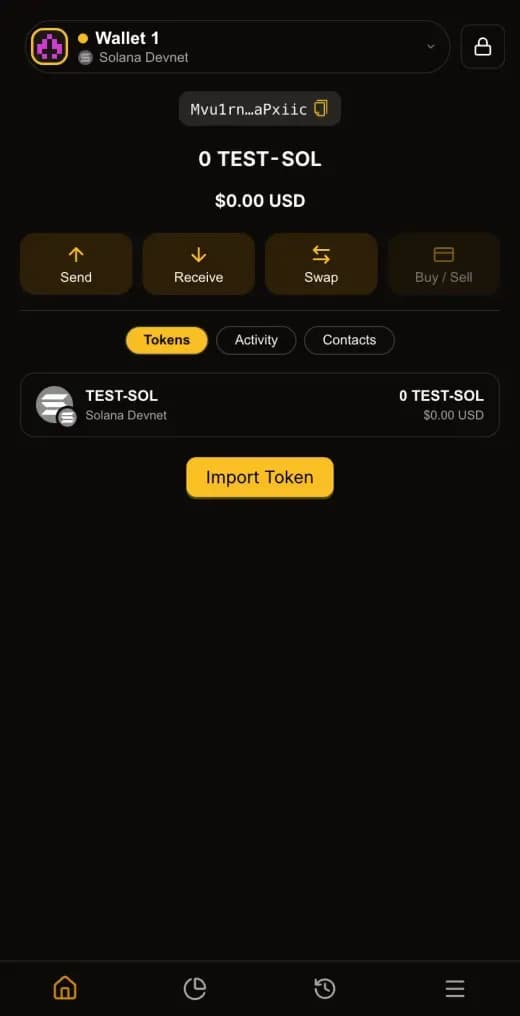
SSP holds SOL and SPL tokens in the same 2-of-2 multisig you already use for Bitcoin and Ethereum: one key in the browser extension, one key on your phone, both required for every transaction. This article explains what that means on Solana specifically — how the address is derived, who pays the fees, what your devices verify, and which parts genuinely differ from the chains you already know.
What Solana is, from a self-custody seat
Solana is a single global state machine that processes transactions in parallel rather than one at a time. For a holder, three properties matter more than the throughput headline.
First, everything is an account. Your balance, a token's mint, a program's code, and a program's stored data all live in accounts with an address and an owner. Second, accounts cost rent: to exist on-chain, an account must hold a minimum SOL balance proportional to its size. That deposit is refundable when the account is closed, but it is real money that has to come from somewhere. Third, transactions expire quickly — a normal Solana transaction references a recent blockhash and becomes invalid roughly a minute later.
Each of those has a direct consequence for two-device signing, and each is handled explicitly in SSP rather than papered over. Solana's own core documentation is the primary source for the account and rent model if you want the raw version.
An address with no creator
On most Solana multisig designs, the wallet has to be created. Someone sends a transaction that establishes it, and the resulting address depends on inputs chosen during that transaction — typically a random one-time key. The practical effect is that the address does not exist until a creator brings it into being, and cannot receive funds before then.
SSP's on-chain program works differently. Your vault address is a fingerprint of the sorted member set plus the approval threshold, and nothing else. Anyone who knows the members and the threshold can compute the address offline, before anything touches the chain. Registration is permissionless: the program only checks that the members you present really do hash to the address being claimed, so registering changes nothing about who is allowed to spend.
That is why there is no creator to trust, no privileged registrar, and no admin key. Spending is gated solely by the threshold check inside the program. If you want the full picture, why Solana multisig addresses are hard covers the underlying problem, the self-initiating Solana multisig covers the program, and SSP versus Squads V4 is the side-by-side comparison.
If the 2-of-2 model itself is new to you, start with what is 2-of-2 multisig.
Why two devices needed a durable nonce
Here is the problem transaction expiry creates. Your extension builds and signs a transaction. Your phone then has to approve it. If you leave the room, eat lunch, and come back, the blockhash the transaction referenced is long dead and the whole thing has to be rebuilt.
SSP solves this with a durable nonce account derived from your multisig address. Instead of a recent blockhash, the transaction references a nonce that only advances when the transaction actually lands. The signing window stops being a stopwatch. You can approve on your phone minutes or hours later and the transaction is still valid — but it can still only be used once, because executing it advances the nonce.
The nonce account is created the first time you send, and it is one of the two accounts whose rent shows up in your first-send cost. Durable nonces and two-device signing goes deeper.
Who pays the fees
On Solana, the account that pays a transaction's fee is the fee payer, and it must sign. That creates an awkward bootstrapping problem for a fresh multisig: the vault needs SOL to pay for the transaction that would move its SOL, and the accounts that need rent do not exist yet.
SSP uses a paymaster. The SSP relay operates an account that signs as fee payer, fronts the network fee and any rent, and is reimbursed by your vault inside the same transaction. There is no separate step, no credit extended, and no way for the reimbursement to happen without your two signatures — it rides along in the proposal your devices approve.
Two consequences are worth internalising:
- You do not need to pre-fund an address with SOL for gas. Receive SOL, send SOL. The first send is where the accounts get created.
- Your first send costs more than the ones after it. The first send pays permanent rent for the multisig account and the nonce account; later sends pay little more than the network fee. Exact figures are in the fees article of this series.
If paymasters as a concept are unfamiliar, gas sponsorship and paymasters, explained covers the general pattern — SSP already uses the same idea on EVM chains, described in Ethereum in SSP.
What you can hold
Solana in SSP supports native SOL and SPL tokens. Out of the box that includes Circle's official USDC mint and FLUX on Solana, and SSP resolves other SPL tokens it finds in your vault.
The distinction that trips people up: on Solana you do not hold a token at your main address. Each token lives in its own associated token account owned by your address, one per mint. That account also needs rent, which is why sending an SPL token to someone who has never held that token costs slightly more — you are paying to bring their token account into existence. SSP creates it automatically as part of the transfer rather than failing with an error, and the token-accounts article in this series unpacks the details.
What your devices check before you sign
Solana transactions are opaque in a way Bitcoin transactions are not. What a transaction does lives inside instruction data, and a wallet has to decode that data before it can tell you anything true about it. A wallet that simply displays what a server told it is asking you to trust the server.
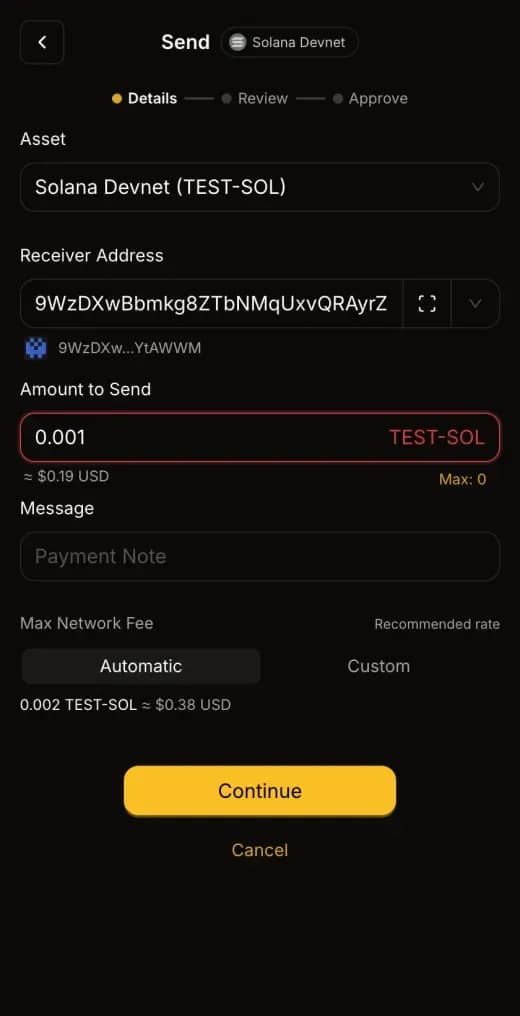
SSP decodes the transaction on your own devices, byte by byte, using the open-source @runonflux/solana-multisig library. The recipient, the amount, and the token mint are read out of the raw bytes and compared against what is being displayed. If they disagree, signing is blocked outright — a mismatch at that point indicates an active attack, not a rendering glitch. For SPL transfers, the token's decimals are embedded in the signed instruction itself, so a mint that claims different decimals causes the on-chain program to reject the transaction.
The same principle governs the program: mainnet builds are reproducible from published source, so the bytecode deployed at SSPWVu7dtTDkZYmDx73StqV46PioSmdiNE7igpjHK1r can be independently rebuilt and compared. A security claim is only worth as much as your ability to check it yourself.
Getting started
Update SSP Wallet and SSP Key to the latest version, then enable Solana from the chain selector. With v2's batch sync you can enable it alongside any other chains with a single approval on your phone. If you have not set up SSP at all yet, setting up your first SSP wallet is the place to begin.
From there Solana behaves like every other chain in SSP: it counts toward your portfolio total, sends follow the same compose → review → approve flow with the full recipient address on screen, and every transaction is co-signed by both of your devices. The mainnet launch announcement covers what shipped and when.