What Actually Stops a Transaction
Every custody product has a features page listing controls: whitelists, spending limits, time locks, approval workflows, IP restrictions. They are all real, and they are all useful. But they are not all the same kind of thing, and treating them as interchangeable is how organisations end up with a security model that is weaker than the marketing implied.
There is a question that separates them cleanly: if every piece of software in the system were wrong or hostile, would this control still hold?
For most of the list, the answer is no. For exactly one, the answer is yes. This article is about telling them apart.
Three layers, not one
Between someone wanting to move funds and the funds actually moving, SSP Enterprise has three distinct barriers. They fail differently, and knowing which is which is the whole point.
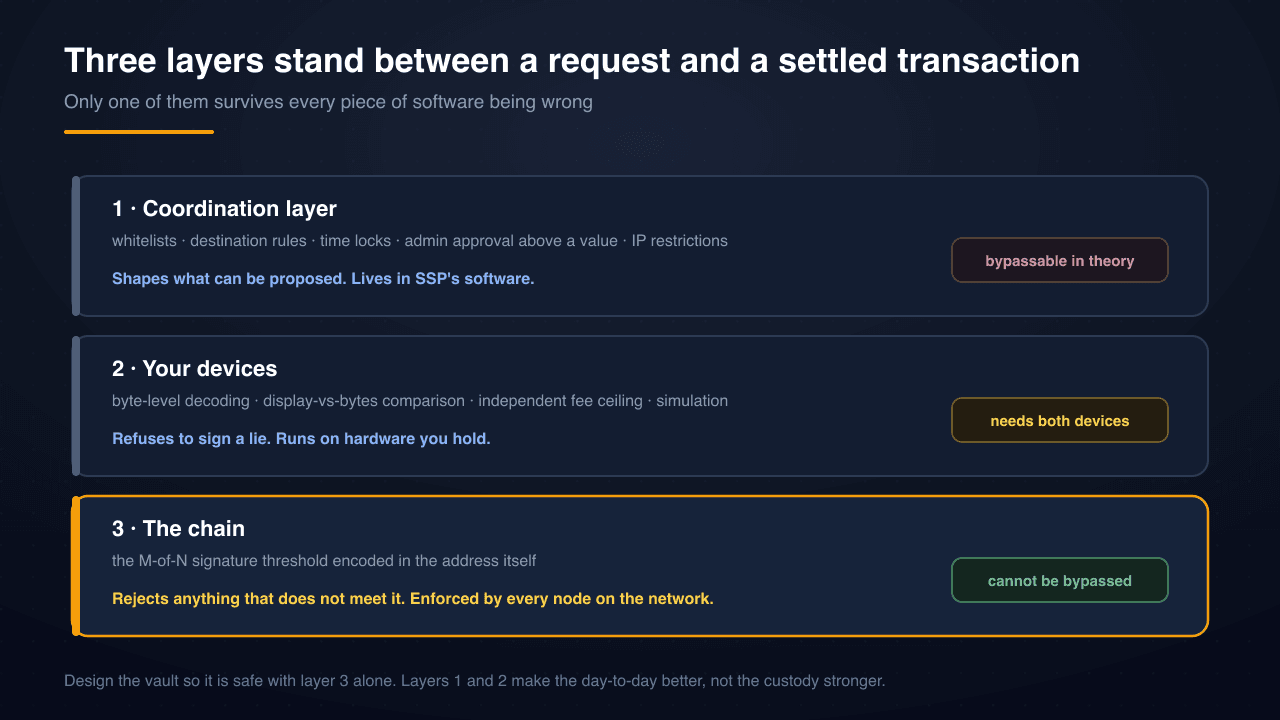
The layers are not ranked by usefulness. They are ranked by what it takes to defeat them.
Layer 1: the coordination layer
This is the policy engine, and it is where most of the features live. SSP Enterprise supports address whitelists, destination-type restrictions, time locks that delay transactions above a value threshold, rules requiring admin approval over a certain amount, and IP restrictions on organisation access. Policy templates give you sensible presets that then materialise as real, editable rules.
These do genuine work. A whitelist stops a mistyped address from ever becoming a proposal. A time lock gives a treasury team a window to notice something wrong. An approval rule makes a large transfer a two-person conversation rather than one person's afternoon.
What they are not is custody enforcement. These rules live in SSP's software and are evaluated by SSP's servers. They are not part of the vault address, and the blockchain has never heard of them. If the policy engine were bypassed — through a bug, a compromised server, or a hostile operator — the rules would simply not apply.
We state that plainly because the alternative is worse. A team that believes its whitelist is a custody guarantee will size its threshold accordingly, and that is exactly the mistake that turns a survivable incident into an unsurvivable one.
Layer 2: your devices
The second barrier is the pair of devices each signer holds, and it is stronger than the first in an important way: it does not trust SSP either.
When a proposal reaches a signer, their devices decode the raw transaction bytes locally and compare the result against what is being displayed. Recipient, amount, token — read from the bytes, not taken from the server's description. On Solana this comparison is explicit and unforgiving: if the decoded bytes contradict the displayed payload, signing is hard-blocked rather than warned about, because a mismatch there indicates an active attack rather than a rendering glitch.
The devices also enforce their own independent ceiling on fee reimbursements. The relay proposes the fee; the wallet refuses to sign one above a hard-coded maximum regardless of what the relay claims, which bounds any fee-routed drain even if the relay is entirely hostile. Simulation runs before approval too, executing the proposal against current chain state so the review screen can show what the transaction would actually do — that arrived with transaction simulation and risk warnings.
This layer defeats a compromised server. What it cannot defeat is a compromised device, or a signer who approves without reading. It also requires both of a signer's devices, which is why per-signer 2-of-2 matters: layer 2 is only as strong as the weaker of the two devices, and they are deliberately different kinds of hardware.
Layer 3: the chain
The third barrier is the only one that holds when everything else has failed.
A vault's address is derived from the signer set and the approval threshold. A transaction that does not carry the required number of valid signatures is not a rejected transaction — it is an invalid one. Every node on the network independently reaches the same conclusion, and no amount of access to SSP's infrastructure changes that arithmetic.
This is why the threshold is the number that deserves the most thought when you create a vault, and why it cannot be edited afterwards. Setting up your first enterprise vault covers the mechanics; 2-of-2 vs 2-of-3 vs m-of-n covers how to choose the number.
Where each layer fails
Laying out the failure modes side by side makes the design job obvious.
| Scenario | Coordination layer | Your devices | The chain |
|---|---|---|---|
| A signer mistypes an address | Stops it | Stops it if they read | Does not care |
| A signer is phished into approving | Stops it if not whitelisted | Shows the truth; they may still approve | Does not care |
| SSP's relay is compromised | Fails | Holds — bytes are decoded locally | Holds |
| SSP's policy engine has a bug | Fails | Holds | Holds |
| One signer's laptop is compromised | Not designed for this | Partially — the phone still checks | Holds |
| An attacker holds fewer than M signers | Not designed for this | Holds | Holds |
| An attacker holds M or more signers | Fails | Fails | Fails |
The last row is the honest bottom of the model. Multisig protects against a minority of your signers being compromised. It does not protect against a majority, and no product can claim otherwise without lying. That is why the threshold and the independence of your signers matter more than any feature list.
What this means for how you set things up
Design the vault so it is safe with layer 3 alone. Pick the threshold and the signer set as though the policy engine did not exist. If the answer makes you uncomfortable, the fix is a different threshold or different signers — not more policies.
Then add policies for the reasons policies are good at. Whitelists catch human error. Time locks buy reaction time. Approval rules create a second pair of eyes on large amounts. These are process improvements and they genuinely reduce incidents; they are just not the thing standing between an attacker and your treasury.
Keep your signers genuinely independent. Two signers on the same laptop, in the same building, with the same recovery arrangement, are closer to one signer than to two. The strength of layer 3 comes from the difficulty of compromising M separate people with M separate device pairs.
Make signers actually read the review screen. Layer 2 is the only barrier that can catch a proposal that is legitimate-looking but wrong, and it only works if a human engages with what their device decoded. A rehearsed round-trip when the vault is created helps build that habit while nothing is at stake.
Ask other custody providers the same question. Whether you use SSP or not, this framing is portable: for each control on the features page, ask whether it survives the vendor's own software being wrong. The answers are often instructive, and a vendor that answers clearly is telling you something good about how they think.
For the ways a multi-key setup gets undermined in practice, multisig failure modes and how SSP mitigates them goes through them one by one, and SSP Enterprise: multisig vaults for teams is the overview of how the pieces fit together.